What is Watermarkly?
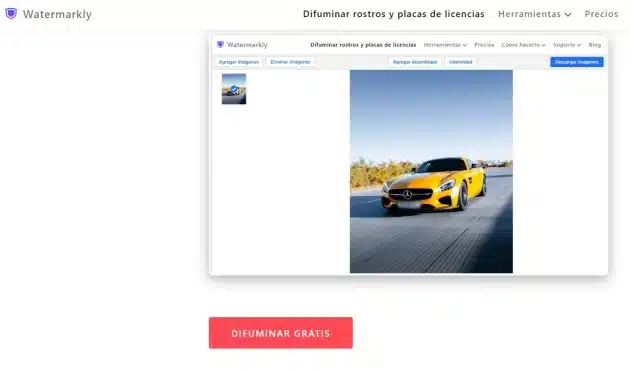
Watermarkly is an artificial intelligence tool designed to blur faces and license plates in images quickly and easily.
Why should you use it?
You can hide sensitive information from your photos before sharing them online, ensuring people's privacy and protecting confidential data.
Tools and Features
Its blur tool is intuitive and easy to use.
You just need to drag your photos into the app and download the blurred copies.
You can blur faces, license plates, or other elements directly in your browser, and adjust the intensity of the blur manually.
Best of all, it requires no additional downloads or registrations, ensuring the privacy of your images.
How to Blur a Face in Watermarkly
The app uses artificial intelligence to automatically recognize faces in images.
Simply upload your photos and watch the tool blur faces immediately.
Furthermore, you have control total about the edition.
You can adjust the shape, size, position and rotation of the blurred areas, even removing the blur if necessary.
Why Blur Faces in Images?
Blur faces in photos It is crucial to protect privacy and avoid negative consequences.
The accidental presence of strangers in your photos can lead to legal problems, since they have not given their consent to be published online.
Additionally, professionals such as doctors, firefighters, rescue workers, and others may also need to blur faces for ethical and legal reasons.
How to Blur License Plates in Watermarkly
Just like faces, the app automatically recognizes license plates and does the work for you.
Just upload the photo and download the result.
If necessary, you can manually adjust the blur area.
This process is essential for protect personal data that could be used improperly.
Blurring Any Part of a Photo
Watermarkly isn't just limited to faces and license plates.
You can blur any part of your photos, whether it's your home address, price tags, brand names, phone numbers or street names.
Just upload the photo, add the blur, adjust as needed and download the result.
Tool Benefits
Watermarkly not only specializes in blurring faces and license plates, but also offers other blurring features. photo editing.
You can crop, compress and resize images, add watermarks to photos and PDF files, and convert to JPG.
The app also allows you to process an unlimited number of photos simultaneously and is easy to master without the need for tutorials.
Main features
- Smart Blur: Uses AI to automatically recognize and blur faces and license plates.
- Versatile Edition: Allows you to adjust the shape, size, position and rotation of the blurred areas.
- No Downloads or Registrations: Direct access from the browser without the need for downloads or registration.
- Multiple Processing: Ability to process an unlimited number of photos simultaneously.
- Compatible in Various Languages: English, Russian, German, French, Polish, Italian, Korean, Dutch, Portuguese and Turkish.
Significant Advantages
- Extensive Functionality: Offers additional options such as cropping, compression and image resizing.
- Easy Mastery: Intuitive interface that does not require tutorials to use.
- Free and Private: Allows you to blur faces at no cost, with the only limitation of adding the Watermarkly logo in the free version.
- Automatic Recognition: AI automatically recognizes elements to blur, simplifying the process.
- Universal Access: Works on any device and operating system, accessible from any browser.
Target audiences
- Amateur and Professional Photographers: To blur faces and license plates in photos from events or sessions.
- Social Network Users: Who want to share photos, while preserving the privacy of strangers present in the images.
- Health Professionals, Rescuers, and Military: To blur faces in ethical and legal situations.
- People Concerned About Privacy: Who want to hide sensitive information, such as addresses or license numbers, before posting photos online.
- Any Individual Requiring Image Editing: Due to its versatility, it is useful for anyone who needs to edit images easily and quickly.
FAQ
How do I blur a face in a photo?
Go to watermarkly.com, choose the face blurring tool, and upload your images.
And that's it!
All faces blur instantly.
If everything looks good, download your photos.
How do I blur faces from an iPhone?
Use the Watermarkly face blur app in your browser.
Do you want more?
Try the mobile version to create watermarks and blur faces before downloading your processed photos.
How do I blur faces for free?
Try the tool! It's free and processes unlimited photos.
Just add the Watermarkly logo.
To remove it, purchase an upgrade.
What is the best app to blur faces?
Watermarkly is a top tool. It's quick and easy.
Automatically blurs faces and license plates, ideal for batches of photos.
Make small adjustments for perfection.
How do I blur something in a photo?
If they are faces or license plates, the app does it.
For other things, click "Add blur", adjust size and shape, download the result!
Easy!
Price plan
Most Popular - 1 year access
€24. It does not renew automatically.
✓ Access for one year
✓ Full access to all tools
✓ Available to use on up to 10 devices
✓ Without the “Watermarkly” logo
✓ 30-day money back guarantee
Permanent Access
€48. One-time fee, not a subscription.
✓ Lifetime access
✓ Full access to all tools
✓ Available to use on up to 10 devices
✓ Without the “Watermarkly” logo
✓ 30-day money back guarantee
Tools included
- Put watermarks.
- Resize.
- Trim.
- Compress.
- Blur the faces.
- Convert to JPG.
- Put text to photo.
- PDF watermark.
Conclusion
Watermarkly It is an essential tool for those looking to protect privacy in their online photos effectively.
With its ability to automatically blur faces and license plates, and a variety of additional editing tools, it provides a comprehensive approach to enhancing and securing your images.
Whether you are a casual user or a professional, Watermarkly offers simplicity and versatility, guaranteeing impactful and confident results.