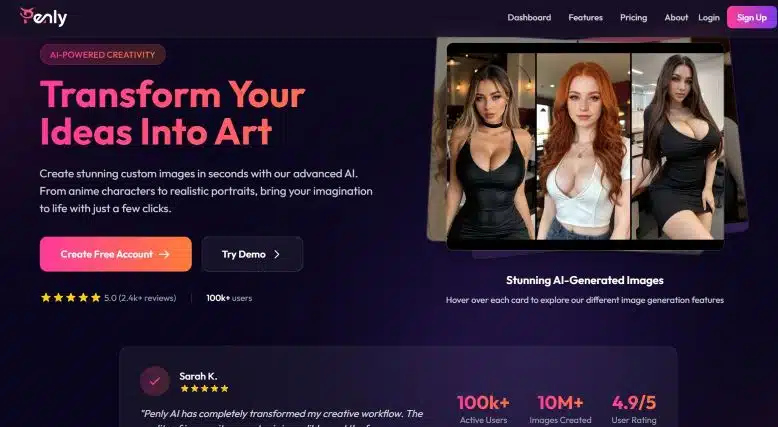
Penly AI: The Ultimate AI Image Production Platform
Penly AI revolutionizes image creation and transformation by combining cutting-edge technology based on Artificial Intelligence with an extremely intuitive interface.
Designed for creatives, designers, marketers, and digital art enthusiasts, this platform makes it easy to generate illustrations, hyper-realistic portraits, and artistic compositions in seconds, without the need for advanced technical knowledge.
What is Penly AI?
It is a cloud-based solution that leverages AI models trained on millions of images and reference data.
Its main objective is to simplify the creative process, allowing any user to transform ideas into high-quality digital art.
When you access the platform, you will find various modules - from image shaping from scratch even tools advanced editing, going through specific functions such as Face Swap y Outpainting.
Origin and evolution
Since its initial launch, it has constantly evolved, integrating:
- Generative Adversarial Network (GAN) Architectures.
- Diffusion models for high-resolution details.
- Performance optimization for generating real-time images.
This evolution has allowed us to add more than 100.000 active users and exceed 10 million images created, with an average rating of 4.9/5.
Key features
The platform's versatility lies in its set of tools, each designed to cover a different stage of the creative flow:
1. Producing images from text prompts
The function AI Image Generation constitutes the core of Penly AI.
Based on a written description, the system interprets your prompt and produces a unique image. Options include:
- Art style: realism, vector, comics, anime, classical painting and more.
- Resolution: from 512×512 to 4K.
- Variations: generates multiple versions of the same prompt to choose the best one.
2. Face Swap
With the module Face SwapFace swapping has never been easier. Just upload two images, select the faces, and the algorithm maps facial features, expressions, and lighting for a natural result.
3. Outpainting
El Outpainting extends the canvas beyond its original boundaries, ideal for enlarging scenes and creating panoramic backgrounds.
AI analyzes existing style and content to maintain visual consistency.
4. Smart Editing (Inpainting)
The tool Inpainting (Smart Edit) allows you to add, remove, or retouch elements of an image using only text descriptions. It's perfect for:
- Remove unwanted objects.
- Add new elements, such as buildings, people, or effects.
- Correct lighting and color details.
5. Creatively inspired conversational chat
El AI chat integrated acts as a creative assistant.
You can ask for ideas, style suggestions, or request iterations of your prompt to improve the results.
Advantages and benefits
The benefits of adopting Penly AI range from improved productivity to expanded creative possibilities:
- Speed: setup in seconds, versus hours of manual labor.
- Accessibility: No design or programming experience required.
- Flexibility: multiple styles and formats.
- Scalability: generates massive volumes of images for large-scale projects.
- Privacy: end-to-end encryption and complete control of your data.
Comparison with similar tools
| Tools | Image making | Face Swap / Inpainting | Outpainting | Creative Chat | API | Free plan | Privacy policy | Average rating |
|---|
| Penly AI | - Text prompts
- Automatic variations
- Styles (realistic, anime…)
| - Face Swap
- Inpainting with text
| Yes, intuitive canvas expansion | Yes, prompt assistant | Yes, REST API | Yes, monthly credits | End-to-end encryption; no data sales | 4.9/5 |
| midjourney | - Advanced Text Prompts
- Own artistic styles
| Not integrated (requires external editing) | No | No | Unofficial | No (only demo on Discord) | Processing on Discord; non-public data | 4.8/5 |
| FROM E (OpenAI) | - Text prompts
- Image editing
| Inpainting (one-off edition) | No | No | Yes, public API | Yes, free credits | Anonymized data; responsible use | 4.7/5 |
dream studio
(Stable Diffusion) | - Text prompts
- ControlNet, LoRA
| Inpainting (bridge) | Yes, with extended models | No | Yes, open API | Yes, open source | Optional local model, full control | 4.6/5 |
| Canva AI | - Text prompts
- design templates
| Basic (background replacement) | No | Yes, design chat | Yes, API for companies | Yes, free part | Corporate Privacy Policy | 4.5/5 |
How Penly AI works step by step
Step 1: Registration and access
After creating your free account, you access the dashboard where you will find all the available modules:
- Image generation.
- Smart editing.
- Face swap.
- Outpainting.
- Creative chat.
Step 2: Module Selection and Configuration
Select the module you need and configure parameters such as:
- Style (e.g. realistic, drawing, 3D).
- Resolution.
- Color or monochrome.
- Number of variations.
Step 3: Prompts and inputs
Enter your text prompt or upload an image to edit. The more detailed your prompt, the more personalized the result will be.
Step 4: Generation and Selection
The AI produces several options; choose the one that best fits your vision. You can refine the prompt or adjust settings.
Step 5: Download and Export
Download your image in JPG or PNG format, compatible with external editing tools.
Functional comparison
| Functionality | Description | Example of use |
|---|
| AI Generation | Create digital art from text | Ebook covers, advertising campaigns |
| Face Swap | Face Swap | Memes, viral marketing |
| Outpainting | Expand scenarios | Video game backgrounds, concept art |
| Inpainting | smart edition | Photo correction, object removal |
Use cases and real-life examples
1. Digital marketing and advertising
Marketing agencies use Penly AI to:
- Design banners and ads in minutes.
- Test multiple creative versions at no additional cost.
- Adapt images to different formats (web, social networks, print).
2. Content Creators and Social Media
Influencers and community managers take advantage of:
- Custom avatars for branding.
- Compelling visuals to increase engagement.
- Uniquely styled video thumbnails.
3. Art and entertainment
Illustrators and game developers use:
- Automatic concept art to save initial sketches.
- Scenarios expanded with outpainting.
- High fidelity character portraits.
4. Education and academic projects
Teachers and students use it to:
- Create visual teaching materials.
- Make presentations with unique graphics.
- Represent historical or scientific concepts visually.
Integrations and APIs
For developers and businesses, it offers a REST API that allows:
- Integrate image creation into your own applications.
- Automate creative workflows.
- Scale requests based on demand.
Security and privacy
Penly AI implements rigorous measures to protect information and copyright:
- Encryption of data in transit and at rest.
- Policy on not selling data to third parties.
- Control of rights over generated images.
User interface and experience
The platform stands out for its clean and accessible design.
The control panel organizes functions into clearly identified tabs.
The user experience includes:
- Real-time preview of results.
- History of saved projects.
- Quick access to tutorials and documentation.
Usage statistics
| Metric | Price |
|---|
| Active clients | 100k + |
| Images created | 10M + |
| Average Rating | 4.9/5 |
| Published reviews | 2.4k + |
Tips to optimize your creations
- Specify color and style details in your prompt.
- Use visual references when the platform allows it.
- Experiment with variations to discover unexpected styles.
- Combine tools: Generate a base with AI and refine it with smart editing.
- Save your favorite prompts and settings for future projects.
FAQ
How do Penly AI models work?
They employ deep neural networks trained on large collections of images and metadata to learn styles, structures, and compositions.
Can I use the generated images for commercial purposes?
Yes, the licenses allow commercial use without additional royalties.
What export formats do you offer?
JPG and PNG in various resolutions, from standard to 4K.
Does the platform store my data securely?
All data is encrypted and the platform complies with data protection regulations such as GDPR.
Do I need a credit card to get started?
No. The free plan allows you to try out basic features at no cost.
How can I upload my own images?
In the Face Swap and Inpainting modules, you'll find a button to upload local files.
Can I control the generation's art style?
Yes, when describing your prompt, you can indicate specific styles (realistic, comic, anime, oil, watercolor, etc.).
Is there a daily usage limit?
The free plan has a monthly credit limit, while paid subscriptions offer unlimited requests.
Conclusion
Penly AI is positioned as a platform full y powerful for image creation with artificial intelligence.
With tools ranging from creating artwork from scratch to precise photo editing, this solution meets the needs of professionals and amateurs alike.
Its focus on privacy, ease of use, and processing speed ensures that any visual project—from advertising illustrations to educational materials—can be executed efficiently and scalably.
Get started today, explore the wide variety of features, and unleash your full creative potential with Penly AI.