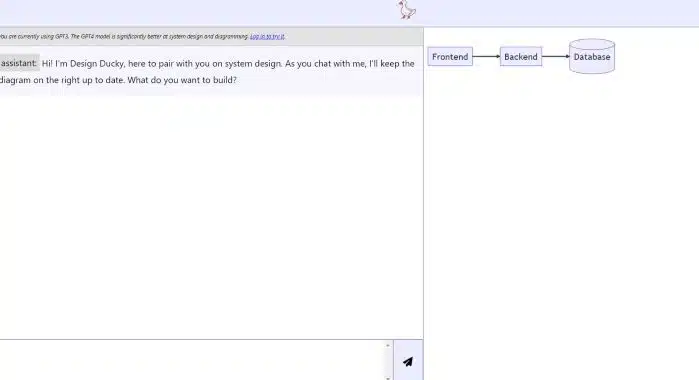
What can I do for you?
Its objective is to assist you in the design of information systems, from the front-end (the part visible to users), the back-end (the part that manages the logic and data behind the application), to the database. data.
You can tell it what you need and it will work with you to create diagrams and visual representations that help you understand and communicate your project more effectively.
How It Works
While you chat with him, he will create and update a diagram on the right of the screen, where you can visually see the structure of your system.
This will allow you to have a clear and organized view of how the different parts of your project relate to each other.
What Can You Design with Design Ducky?
You can use Design Ducky for a wide variety of projects, such as websites, mobile apps, database management systems, or virtually anything that requires system design.
Areas in which it can help you
- Frontend: The frontend refers to the user interface of your project. With Design Ducky, you can design how your app will look and feel, including the layout of elements, buttons, menus, and more.
- Backend: It is the part of the system that is responsible for logic and data processing. Here, you can design how different parts of your application will work, how they will communicate with each other, and how data will be managed.
- Databases: The database is where your project data is stored and managed. You can use Design Ducky to design the structure of the database and how different tables and entities relate to each other.
Main features
- Integration with GPT4: Design Ducky stands out for its integration with the GPT4 model, providing powerful system design and advanced diagramming capabilities.
- AI Virtual Assistant: This tool acts as an artificial intelligence virtual assistant that helps users in creating and updating diagrams, facilitating communication and project visualization.
- Full Support: Design Ducky is versatile as it offers support for both Front-end and Back-end development, and also database management. You can work on all phases of your project in one place.
- Real Time Updates: The chat interface allows interactive communication, and the changes you make are reflected on the diagram in real time. This improves collaboration and agile decision making.
Significant Advantages
- Improved Efficiency: Thanks to its integration with GPT4, Design Ducky enables faster and more accurate system design, saving users time and effort.
- Facilitates Communication: The tool provides an effective way to communicate your ideas and design plans through visual diagrams, simplifying team collaboration.
- Flexibility of Use: Design Ducky is useful in a wide variety of projects, from websites to mobile applications to database management systems, making it a versatile solution.
- Real Time Interaction: The ability to make changes and see them immediately reflected in the diagram allows for more agile and accurate decision making during system design.
- Trusted AI Solution: Being developed by the Design Ducky team, this tool is a reliable AI solution and backed by expert system design professionals.
Target audiences
- Software Developers: Design Ducky is a valuable tool for software developers who need to design the architecture of complex systems, whether in the frontend, backend or databases.
- User Interface Designers (UI/UX): UI/UX designers can use Design Ducky to visualize and communicate user interface designs effectively.
- Project Managers: Project managers find in Design Ducky a tool that facilitates project planning and monitoring, improving communication and decision making.
- Software Development Teams: Entire development teams, including programmers, designers, and database administrators, can benefit from Design Ducky to coordinate and collaborate on projects.
- Companies and Organizations: Companies working in software development, from startups to established corporations, can leverage Design Ducky to streamline their system design and development processes.
- Students and Educators: Students studying computer science, software development, or systems design can use Design Ducky to learn and practice creating systems diagrams. Educators can also use it as a teaching tool.
- Freelance Professionals: Freelance developers and designers can find Design Ducky a tool that allows them to represent their ideas effectively to clients.
- Anyone Interested in Systems Design: Anyone with an interest in system design, whether for personal or professional projects, can take advantage of Design Ducky's capabilities.
Conclusion
Design Ducky It is a powerful and versatile tool for the design of information systems.
By integrating GPT3 and GPT4 artificial intelligence models, it offers an advanced and efficient experience.
Its virtual assistant makes it easy to create and update diagrams, while support for front-end, back-end, and databases makes it ideal for a variety of projects.